The Big Picture of Software Development
The Big Picture of Software Development
Written by Marlyn Gregorio ୦ Posted last September 29, 2024
SOFTWARE REQUIREMENTS
In the software development process, requirement phase is the first software engineering activity. This phase is a user-dominated phase and translates the ideas or views into a requirements document. Note that defining and documenting the user requirements in a concise and unambiguous manner is the first major step to achieve a high-quality product.
The requirement phase encompasses a set of tasks, which help to specify the impact of the software on the organization, customers’ needs, and how users will interact with the developed software. The requirements are the basis of the system design. If requirements are not correct the end product will also contain errors. Note that requirements activity like all other software engineering activities should be adapted to the needs of the process, the project, the product and the people involved in the activity. Also, the requirements should be specified at different levels of detail. This is because requirements are meant for people such as users, business managers, system engineers, and so on. For example, business managers are interested in knowing which features can be implemented within the allocated budget whereas end-users are interested in knowing how easy it is to use the features of software.
What is Software Requirement?
Software requirements refer to the description of the features and functionalities of a software system that meet the needs and expectations of its users and stakeholders. These requirements define what the software should do, how it should perform, and what constraints it should operate within. Software requirements can be functional (e.g., user authentication) or non-functional (e.g., performance, security).
Requirement is a condition or capability possessed by the software or system component in order to solve a real-world problem. The problems can be to automate a part of a system, to correct shortcomings of an existing system, to control a device, and so on. IEEE defines requirement as (1) A condition or capability needed by a user to solve a problem or achieve an objective. (2) A condition or capability that must be met or possessed by a system or system component to satisfy a contract, standard, specification, or other formally imposed documents. (3) A documented representation of a condition or capability as in (1) or (2).
Requirements describe how a system should act, appear or perform. For this, when users request for software, they provide an approximation of what the new system should be capable of doing. Requirements differ from one user to another and from one business process to another.
STAKEHOLDERS
A stakeholder is any person or a group of persons with an interest, usually financial, in the success of a business. The core stakeholders of a corporation include shareholders, workers, consumers, and suppliers.
With growing concern about corporate social responsibility, the term has evolved to be applied to communities, governments, and trade associations.
- A stakeholder has a vested interest in a company and can affect or be affected by its operations and performance.
- Stakeholders may include investors, employees, customers, suppliers, communities, governments, and trade associations.
- An entity’s stakeholders may be internal or external to the organization.
- The public may also be construed as a stakeholder in some cases.
Understanding Stakeholders
- Users
- Project Funders
- Business Owners
- Developers
- Testers
- Customers
- Regulatory bodies
CONTEXT DIAGRAM
So much of project management focuses on internal systems, and rightly so. It’s essential for organizations to perfect their own processes to stay competitive. However, it’s just as important to take a look at external factors that may impact your core structures.
This is where context diagrams can help.
What is a context diagram?
A context diagram is a graphical representation of a system that includes its boundary, input, and outputs. It gives a high-level view about interaction boundaries the system will have with its environment, such as users, other systems, or even other external factors. A context diagram supports- Define system boundaries
- Define system interfaces
- Define system boundary
- Define system requirements
Context diagrams are easily used in developing software: they help better understand the context in which the system lives and with whom the stakeholders interact.
A context diagram is a high-level view of a system. It’s a basic sketch meant to define an entity based on its scope, boundaries, and relation to external components like stakeholders.

Otherwise known as a Level 0 data flow diagram, a context diagram provides a general overview of a process, focusing on its interaction with outside elements rather than its internal sub-processes. The latter is typically reserved for more advanced data flow diagrams.
- Define system boundaries
- Define system interfaces
- Define system boundary
- Define system requirements
Context diagrams are easily used in developing software: they help better understand the context in which the system lives and with whom the stakeholders interact.
A context diagram is a high-level view of a system. It’s a basic sketch meant to define an entity based on its scope, boundaries, and relation to external components like stakeholders.
Otherwise known as a Level 0 data flow diagram, a context diagram provides a general overview of a process, focusing on its interaction with outside elements rather than its internal sub-processes. The latter is typically reserved for more advanced data flow diagrams.
USE CASE MODEL
What is Use Case Modeling?
This refers to the art of software development and system engineering applied to define the functional needs of a system. It deals with how a system should be understood and documented in relation to its end-users. In other words, it answers the question, "What functions should exist to help the system meet the needs and goals of its users?"
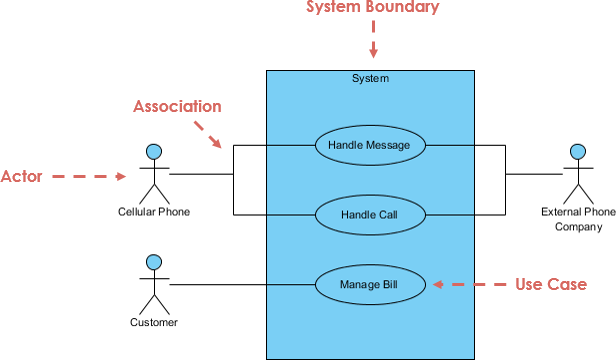
A use case diagram is a graphical representation used in use case modeling to visualize and communicate these interactions and relationships. In a use case diagram, you’ll typically see actors represented as stick figures, and the use cases (specific functionalities or features) as ovals or rectangles. Lines and arrows connect the actors to the use cases, showing how they interact.
- Actors: These are the entities or users outside the system who interact with it. They can be people, other systems, or even external hardware devices. Each actor has specific roles or responsibilities within the system.
- Use Cases: Use cases represent specific functionalities or processes that the system can perform to meet the needs of the actors. Each use case typically has a name and a description, which helps in understanding what it accomplishes.
- Relationships: The lines and arrows connecting actors and use cases in the diagram depict how the actors interact with the system through these use cases. Different types of relationships, such as associations, extend relationships, and include relationships, can be used to specify the nature of these interactions.
Key Concepts of Use Case Modeling
- Functional Requirements: These specify what attributes, behavior or operations the system must exhibit to achieve its goals. Use case modeling is primarily focused on describing and capturing the requirements in an orderly manner.
- View of the System from an End User: Use Case Modeling Begins with a view of the system from the point of view of the people or entities (called "actors") who will interact with the system. Important to understand how these actors are to use the system to accomplish something for themselves.
- Interactions: The use case modeling focuses on interactions of the users with the system. In other words, it is not about what a system does in isolation; but rather it is about how it responds to actions or requests from its users.
- Functional Requirements: These specify what attributes, behavior or operations the system must exhibit to achieve its goals. Use case modeling is primarily focused on describing and capturing the requirements in an orderly manner.
- View of the System from an End User: Use Case Modeling Begins with a view of the system from the point of view of the people or entities (called "actors") who will interact with the system. Important to understand how these actors are to use the system to accomplish something for themselves.
- Interactions: The use case modeling focuses on interactions of the users with the system. In other words, it is not about what a system does in isolation; but rather it is about how it responds to actions or requests from its users.
The Basics of Use Case Modeling
- A use case is a description of how a system interacts with one or more external entities, called actors, to achieve a specific goal.
- A use case can be written in textual or diagrammatic form, depending on the level of detail and complexity required.
- A use case should capture the essential and relevant aspects of the interaction, such as the preconditions, postconditions, main flow, alternative flows, and exceptions.
- A use case is a description of how a system interacts with one or more external entities, called actors, to achieve a specific goal.
- A use case can be written in textual or diagrammatic form, depending on the level of detail and complexity required.
- A use case should capture the essential and relevant aspects of the interaction, such as the preconditions, postconditions, main flow, alternative flows, and exceptions.
Comments
Post a Comment